Monday, 26 November 2012

Samsung Galaxy Note II passes 5m global sales


Samsung’s Galaxy Note II has passes the 5,000,000 sales mark, the company has announced, racking up two million of those sales in under a month. The new milestone comes just a few weeks after Samsung said it had shifted 3m Note II handsets, eagerly crowing about the 5.5-inch smartphone/tablet hybrid after some critics said a device of its size simply wouldn’t sell.
Instead, global sales have flourished, and while the Note II is still well behind sales of Samsung’s more mainstream flagship smartphone, the Galaxy S III, a recent debut in North America has broadened the market for the stylus-enabled device. The handset was first put on the market five months ago.
As always with these sales numbers, it’s usually the case that Samsung is talking about its own sales to distributors, carriers, and retailers, not necessarily to end-users. However, although that means there aren’t necessarily 5m Note II units out there in users’ hands, it’s a good indication of how much demand for the sizable smartphone those vendors expect to see.
Samsung “will do our best to continue to introduce continuous product innovation” one spokesperson said of the Note II sales. The company is tipped to be revealing a new flagship, anecdotally known as the Galaxy S 4, in February next year, complete with an updated quadcore processor and 13-megapixel camera.

Review: Windows Phone 8 operating system

Microsoft announced Windows Phone 8 (WP8), the latest version of its mobile operating system in June. The phones powered by it are now appearing in the Indian market. HTC 8X and HTC 8S are already available, though finding them is not too easy. Nokia andSamsung are gearing up to launch their WP8 devices. 

But how does the OS compare to Android and iOS, which powers iPhone? Are WP8 smartphones better than Android devices and iPhone? 

Let's take a look at WP8 features that are likely to matter to consumers and see what has changed compared to the earlier version of the OS. 

User interface: In terms of user interface, WP8 doesn't change anything. Just like the earlier versions of the software, WP8 looks beautiful with layered users interface, clean lines, and lots of square boxes - Microsoft calls them tiles - that replace program icons. These tiles, unlike icons, are bigger and can display nuggets of information. For example, the Mail tile can show the number of unread mails. The layers in the OS give the user interface a 2D effect. It is a very unique and modern design and works well. We tested WP8 with HTC 8X and found no lag or low frame rates in the user interface. 

New lockscreen: The original Windows Phone had no notification system. It relied on live tiles to show new information to users. But WP8 has a lockscreen where six apps can show their notifications. However, compared to what competitors have in their mobile software, it is still basic. Apps can also use lockscreen as a canvas where they can show information or change content. For example, Bing app can refresh the lockscreen wallpaper to match it with whatever it is showing on its website. 

Customizable homescreen: Previous versions of WP had an empty bar on right side of the homescreen. This, we believe, was added for design reasons as it gave the screen some depth and highlighted its 2D effect. But in WP8 it is gone. Now the live tiles can stretch across the screen and show more content. The tiles can also be resized as tiny small or big. This makes the homescreen on WP8 immensely customizable. 

Rooms: This is a new feature that allows users to club their contacts together. Once a Room has been created with a few contacts, the users part of it can share calendar, chat room, videos and photos etc with ease. 

Support for better hardware: With Windows Phone, Microsoft decides what sort of hardware its partners can put in the devices. Compared to the previous WP versions, WP8 supports better hardware, including dual-core processors, 720P resolution screen, better cameras and 1GB RAM. It also supports storage expansion through microSD cards, something that was not available to WP users earlier. 

Kid's Corner: This is one of the signature features of WP8. It allows users to create a separate list of apps that restrict any kid using the phone to that list. This means, when your kid is playing Angry Birds on the phone, he can't go to your Twitter app, even accidentally. For people who don't share their phones with kids, this feature may not matter much. But those who do will appreciate the usefulness of it. 

Integration with Twitter and Facebook: This is something that WP has since very beginning and nothing changes in the latest version of the OS. WP8 can not only show your social buddies as part of your contacts but can also fetch updates from their Facebook or Twitter feeds into the People app. Meanwhile, your mention on these websites appears in Me app. Some people find it pretty useful. However, in our use we found that Me or People apps are not full-fledged social networking apps. Third-part apps are still necessary. But using them leads to the scenario where several apps show same content. 

Useful maps: For WP map and location services Microsoft earlier relied on Bing maps. But with WP8, it is using data provided by Nokia. This makes the maps and location services in WP8 lot more useful, especially to users in India. 

Better multitasking: Windows Phone 7 allowed users to switch between apps but as soon as an app went into the background, the app was paused. It was resumed again when a user switched to it. In WP8, Microsoft has fine-tuned the resuming to make it fast, as well as has added support for apps that require active data connection when they are in the background. But the multitasking still feels jarring. Freezing video player or word processor works fine but for apps like Rowi, which is supposed to run all the time to pull tweets whenever they are posted, it doesn't work. Though at the moment, it is also likely that older apps like Rowi are yet to be updated for WP8. 

How it compares to Android
Primarily, WP8 devices are going to compete against Android phones. While earlier versions of WP were no match for Android, with WP8 things look more balanced. Android phones have better flexibility in how you use them, better multimedia performance, access to more (and better quality) apps, a much better notification system, more useful multitasking and most likely better hardware at a given price point. However, WP8 devices have a better user interface with fast performance and are likely to have better physical design. They are also simpler to use compared to Android devices. 

How it compares to iOS
While iPhone 5 is a very good device, iOS is getting a little long in the tooth. WP8 has a better user interface, better-integrated maps, better file management. In terms of performance, both iOS and WP8 are on equal footing. iOS is slightly better as far as multitasking and notification system are concerned. But the area where iOS wins big, nullifying most WP8's advantages, is the ecosystem. iPhones have access to significantly better and more useful apps compared to what WP8 phonescan get at the moment. 

Bottomline
Windows Phone has improved a lot. In its current iterations it is now a valid choice for people who are fed up of how slow or laggy Android feels or don't like the fact that most Android phones don't get timely updates. 

Similarly, a WP8 device is a reasonable option if you want a well-designed phone that is simple to use but don't like iPhone, either because it has a smaller screen or due to its high cost. 

But there are compromises involved. Like multitasking quirks. Or lack of proper notification system. Or a not-so-well-stocked app store. It's all about figuring out what is important to you. In nutshell, all we can say is that: If you want a phone that 'just works', get an iPhone. If you want the best value for money, best features and the most flexible phone, get an Android device. And if you want something that has a fresh interface, fast performance, looks great and is easy to use, get a Windows Phone 8 device.

uploaded cookies

‎1 Uploaded cookies
--------------------------------
id=3856651&pw=719850305e553649665c493b199d0cbcded30b31&cks=2f3c26eee2c0
--------------------------------
Checked 
November 26, 2012, 7:55 pm GMT +1

Sunday, 25 November 2012

‎1 Uploaded cookies & Extabit


‎1 Uploaded cookies
--------------------------------
id=7089059&pw=35efe61fbaca01e7b7ff2af4d755df22b75565e3&cks=f3411901b06e
--------------------------------
Checked 
November 25, 2012, 7:47 am GMT +1


1 Extabit cookies
--------------------------------
5b2cab134dd79fe912ae7fc2f56ebd54
--------------------------------
Checked 
November 25, 2012, 5:12 am GMT +1

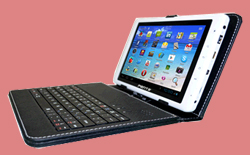
First Voice Calling tablet of India launched by Pantel at Rs 8299


Pantel Technologies has launched India's first voice calling tabletPenta T-Pad priced at Rs 8299. This tablet has an inbuilt SIM slot that gives it 2G SIM connectivity and operates on Android operating system.
Penta T-Pad tablet has an 8-inch multi-touch capacitive screen. Penta T-Pad operates on Android 4.0 Ice Cream Sandwich operating system. It generates its power from 1.2GHz Cortex A8 processor and comes with 400 Mali GPU and 1GB DDR3 RAM.
This tablet comes with Wi-Fi and Bluetooth technology. It also has 3GUSB Dongle support.
It has an 8 GB of internal storage, which can be expanded up to 32GB using a micro SD card slot.
Output port includes an USB port, micro SD Card slot, 3.5mm audio Jack and a HDMI port.
It comes with an optional keyboard with an inbuilt stereophonic speaker system. It is priced at Rs 1,499.
Penta T-Pad runs on a 5,000-mAh battery that gives the tablet browsing time of approximately 5-6 hours.
Penta T-Pad sports a 0.3 Mega Pixel Front camera.

6 simple tips to fix damaged smartphone


 A modern day tech user - and who is not one these days - has taken to buying handheld mobile devices like never before. For most of us, carrying a smartphone or a tablet is no different than carrying our wallet. But like most electronic devices, something or the other can go wrong with the best of them. 

The worst part of owning these devices comes if one has to take them to a service centre. Many problems are either not covered in the warranty, or a heavy bill and inconvenience awaits the user. In fact, the experience of going to a service centre can be a nightmarish experience in itself with the best of brands. 

But more often than not, the condition of your favourite gadget may actually not be as bad as it seems and you can fix the problem yourself by following some simple steps. Here are some tips. 

'Druken' smartphone
If your phone gets wet, never ever try to switch it on as it may cause short-circuiting in the phone and may lead to a bigger loss. Immediately remove your phone's battery and then use a towel to dry the physical parts of the smartphone and once you are through it, bury your phone and the battery in a bowl full of rice. This will cause the rice to absorb all the water and moisture from the device. 

One of the best things you can do is to place the wet smartphone on the back of your PC monitor or TV screen over the heat vents. The conventional heat waves coming out of these devices are just perfect to dry and fix your phone. Else, you can place the smartphone in front of the air conditioner as well. Since the cold air coming from the AC is dry, it will dry up your phone quicker than you may expect. 

You can simply detach all the removable parts of your smartphone including the battery and keep it in the oven for over night. But be very sure to set oven only to warm lest some serious damages may occur. 

To be on the safer side you can later use a hair dryer to remove the remaining moisture and water from the phone, however, never use a dryer as the first solution. This will worsen the situation by blowing the water droplets into deeper areas of your phone. 

Scratches on the screen
Using your smartphone without a screen guard is not really a brave act because the scratches that will appear on screen after sometime will really pinch you hard. 

Well, toothpaste can help you fix those scratches and make you phone's screen as shiny as your teeth.Just put toothpaste on the screen and gently rub it in circular motion with a soft cloth or cotton and then wipe the whole thing with a soft and slightly damp cloth. 

Note: Make sure it is a toothpaste and not a tooth gel. 

Phone shuts-off randomly
Another common problem that occurs with smartphones is that they randomly shut off. Well, this point towards two things: Either you have dropped your phone a good number of times or the battery is loose. 

Buying a new battery can be an expensive solution especially when you can solve this problem with a tiny bit of paper.All that you have to do is to take a small bit of paper and fold it. Then open the back cover of your phone and insert the folded bit of paper between the edge of the battery and the edge of the phone, on the opposite side where the terminals of the battery are located. This will keep the battery firmly in place and stop your phone from shutting down. 

Ice cold batteries
Bought a new phone battery and it is losing charge within weeks? Then you can try keeping it in the refrigerator. Sounds odd but it is true. Most of the smartphones use lithium ion batteries that get exhausted because of the heat generted during their use. 

Keeping them in cold environment not only extends their life but also increases their power. But make sure that the batteries are wrapped in a poly bag or a zip lock bag while they are inside the refigerator. 

The other simple ways are by turning off screen's auto-rotate function, Bluetooth, reducing the screen brightness and GPS. If you are not really bothered about using the Wi-Fi and have an internet pack activated, you can switch off the Wi-Fi as well. However, if the problem still persists, it is likely a software issue and you must take your phone to a technician. 

Fixing crashed Android apps
Applications are what make a smartphones really smart. An Android app can crash within minutes of downloading and can cause your phone to hang. Reasons can be many but you can fix it by following these steps. Pull the battery slowly from the phone. This step is called soft reset and doesn't affect data in your phone, but can help you resolve issues such as a crashed app. 

Once your phone restarts, you can go to Google Play > My Apps and then click on the app to update it. In case an update is not available then simply uninstall the app and then reinstall it. 

Stuck pixels
Stuck pixels are the dead pixels that appear on the smartphone screen as a stationary black dot or a bright white or red spot. You can try removing them by gently massaging the area around the stuck pixel with a soft cloth. By this method, you are allowing the pixel to reorient itself and regain colour.

Driver Genius Professional 11.0.0.1128


Driver Genius Professional is a professional driver management tool features both driver management and hardware diagnostics. Driver Genius provides such practical functions as driver backup, restoration, update and removal for computer users. If you often reinstall your operating system, you may not forget such painful experiences of searching all around for all kinds of drivers. If unfortunately you have lost your driver CD, the search will be more troublesome and time-consuming. Now with the driver backup function of Driver Genius, you can backup all drivers in your computer before reinstalling, and restore them with the driver restoration function after system reinstallation has been completed. This will dramatically save your time for driver installation during the system installation procedure, and you will no longer worry about where to find a driver. Besides, you can create an automatic installation package for all drivers in your system by Driver Genius. After you have reinstalled your operating system, you can restore all your drivers in just a click by this automatic restoration program. It’s really convenient.
Password: techruin